The app in short
What Is Cinema HQ?
Cinema HQ is a free media app for Android that puts movies, TV shows, live TV, anime and retro games behind one home screen. Pick a title, open its page, choose a playback source, and watch. There is no account to create before you browse, and no subscription to buy before you press play.
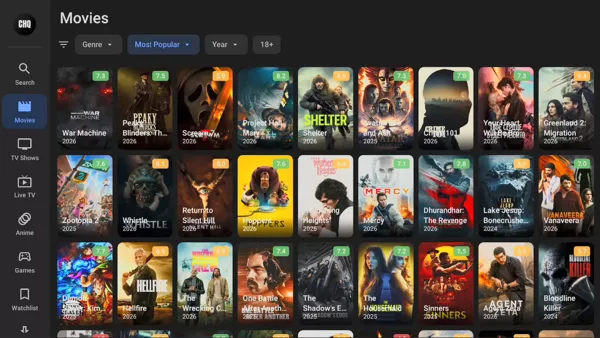
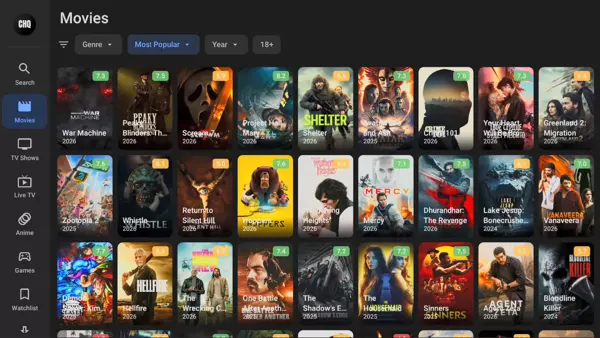
The Cinema HQ app is built first for the big screen. Its rows, large posters and remote friendly menus feel natural on Android TV, Google TV and Fire TV, while the same app works on phones and tablets for watching on the move. Search covers titles, actors and genres, and filters let you narrow a browse by genre, year or rating.
Cinema HQ does not host video itself. It gathers playback sources for a title and hands the stream to its built in player or to an external player you choose, such as VLC or MX Player. That design is why the same title can offer several sources, and why one source can fail while another plays cleanly. This page is the download home for the app: the file, an honest review of how it feels to use, and guides written from real sessions on real devices.
Inside the app
Cinema HQ Features
Every feature below is part of the current Cinema HQ build, as listed by the developer and checked in our own sessions.
- Movies on demand: browse a large movie library by genre, year and rating, then open a title page with its sources in one place.
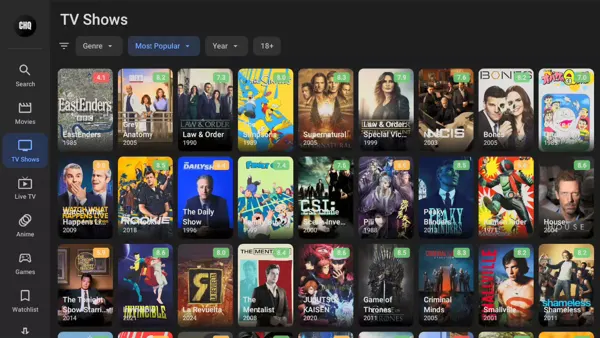
- TV shows with seasons: full season and episode lists, so a series stays organized from the first episode to the finale.
- Live TV: live channels from built in sources and from playlists you add yourself, with a channel guide where the source provides one.
- Anime section: series, movies, OVAs and specials in their own section, with subtitle support where the source carries subtitles.
- Retro games: a built in library for classic console titles, with emulator support for play on a phone or a TV.
- Smart search: search across movies, shows, anime and actors at once, then filter the results instead of scrolling shelves.
- Watchlist and history: save titles for later and pick up where you stopped, with optional Trakt sync across devices.
- Downloads: save supported titles for offline viewing through a connected debrid service, where the source allows it.
- Debrid support: optional connections for Real-Debrid, Premiumize, TorBox and AllDebrid, for cached high quality sources.
- External players: send playback to VLC, MX Player or another player you already trust, from the settings menu.
One home screen, many shelves
Movies, TV Shows, Live TV and More
The Cinema HQ home screen is organized as rows, and each row answers a different mood. Trending rows surface what other viewers are opening. Genre rows let you commit to a kind of evening, comedy or thriller or documentary, without wading through everything else. The TV section keeps seasons together, so returning to a show means one tap on the next episode, not a fresh search every night.
Live TV is the section most newcomers miss. Alongside the on demand shelves, Cinema HQ carries live channels, and it also accepts your own M3U playlist or Xtream Codes login, with an electronic programme guide where the provider supplies one. If you already have a playlist from a legal provider, this is where it lives, inside the same app as your movies.
Anime gets its own corner rather than being buried inside the movie shelves, with subgenres and specials listed separately. Retro games are the surprise shelf: classic titles with emulator playback, a good fit for a TV remote and a spare half hour. Together the sections make Cinema HQ a single evening app, not five apps you have to juggle.
From the real app
Cinema HQ Screenshots
Every frame below is a real screenshot from the current Cinema HQ build: the dark home screen, the browse rows and the TV friendly layout as you will actually see them. No renders, no artwork, just the app.
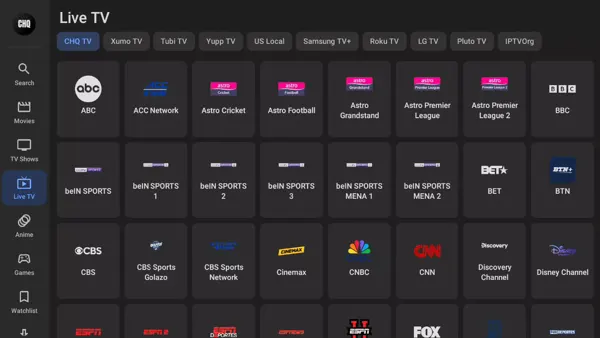
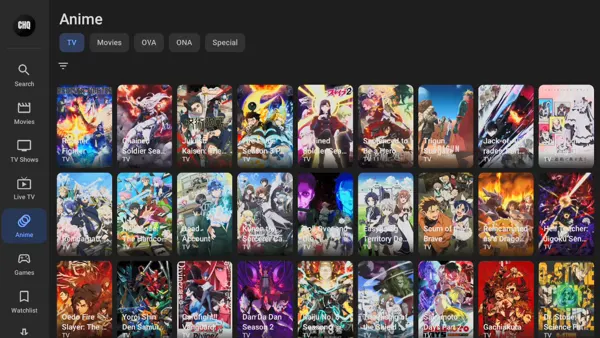
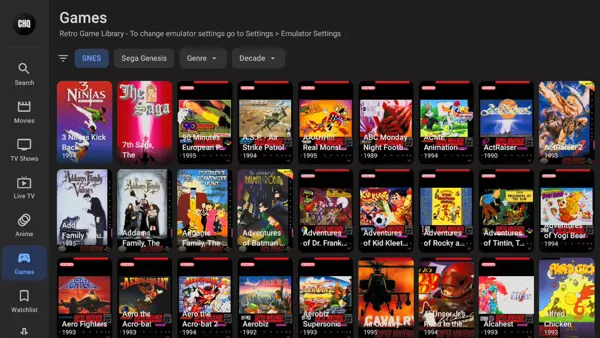
The current build
What Is New in Cinema HQ
The current Cinema HQ build is a TV first release. Its home screen rows are built for remote navigation, its live TV section accepts playlists and programme guides, and its debrid connections cover the four services viewers ask about most: Real-Debrid, Premiumize, TorBox and AllDebrid.
Playback is where the current build earns its keep. Sources are listed by quality, subtitles can be picked per title, and an external player can take over when the built in player struggles with a format. The app also runs without banner ads or popups, funded instead by an optional background service you can switch off in settings, so the viewing screen stays clean.
If you are updating from an older build, expect the same shelves in a tidier layout, faster source lists and steadier Trakt sync. Your watchlist and history carry over when Trakt is connected; without Trakt, treat an update as a fresh start for local history and re-save the handful of titles you follow.
Trust, stated plainly
Safety and Verification
Cinema HQ is not listed on Google Play, so it arrives by sideloading, and sideloading deserves a straight answer. The file on the download page is the developer download, served through the developer download page, and its size is a useful first check: the complete file is about 31 MB. A file much smaller than that is an incomplete download, not a different version, and it should be downloaded again rather than installed.
Before this page went up, the build was installed on the five test phones and TV devices listed on the how we review page, and the core paths were walked: install, browse, search, play a title, switch to an external player, and connect a debrid account. Nothing in the install asks for payment details or for an account, and the app works without signing in anywhere.
Two cautions belong here too. First, only install the file from this page or from the developer download page, never from a renamed copy passed around elsewhere, because renamed copies are where modified builds hide. Second, the app gathers sources from across the web, so the legality of a given stream depends on the source and on your local rules; use the app with sources you have a right to watch, and keep your device software updated.
Your own words, in order
How to Install Cinema HQ on Android
Cinema HQ needs one permission that store apps never ask for, because it is not installed from a store. The steps below are written for a phone; the TV version follows the same logic with a remote, and the Firestick guide covers the Downloader route in full.
- Fetch the file from the download page. Open the download page on this site, wait for the short countdown, and save the file. Check that the finished file is about 31 MB before you go further.
- Open the saved file. Pull down the download notification or open your Files app and tap the file. Android will pause and ask about installing from this source.
- Allow installs from your browser or file manager. On the permission screen, switch on the allow toggle for just that one app, then go back. Android asks per app, so you are not opening the door for everything on the phone.
- Tap Install and wait. The install takes under a minute on a modern phone. Tap Open when it finishes, and give the app a moment on first launch while it builds its home rows.
- Start with search, not scrolling. Search for one title you know well, open it, and try a source. If the first source buffers, back out and try the next one before changing any setting.
Keeping it current
How to Update Cinema HQ
Cinema HQ does not update through a store, so updates arrive inside the app or as a fresh file from the download page. When the app shows an update notice, follow it and install over the existing app rather than removing it first; installing over the top keeps your local settings in place.
If no notice appears and you know a newer build is out, download the current file from the download page and install it the same way, over the existing app. Do not clear the app data before updating, or you will lose local history and saved titles. With Trakt connected, your watchlist and progress sync back after the update; without it, your local lists are the copy that matters, so keep them safe.
Where it runs
Devices That Run Cinema HQ
Cinema HQ runs on Android phones and tablets, on Android TV and Google TV, and on Fire TV devices including the Fire TV Stick. The TV interface is the one the app is designed around, so a remote and a large screen are its natural home, but the phone build carries the same shelves and the same search.
On a computer, the app runs inside an Android emulator, which creates an Android environment on Windows or Mac and lets you install the same file there. Performance on an emulator depends on the computer, so a phone or a TV box will feel smoother for long sessions. The app needs a stable internet connection for streaming, and higher quality sources need a faster connection; on a slow connection, pick a lower quality source rather than fighting the top one.
Under the hood
Technical Details
Cinema HQ is distributed as a single APK file of about 31 MB, installed by sideloading on Android devices. It needs no root access and no account to browse, search or play from free sources. Optional features need their own accounts: Trakt for watchlist sync, and a debrid service for cached premium sources.
Playback supports the built in player and external players, with subtitle selection where the source provides subtitles. Downloads are available for supported titles through a connected debrid service. Live TV works from built in sources and from user supplied playlists in M3U format or through an Xtream Codes login, with programme guide data where the provider supplies it.
Honest balance
Pros and Cons
The strengths are real: one app for movies, shows, live TV, anime and retro games; a TV friendly layout that respects a remote; multiple sources per title; optional debrid and Trakt connections; and no account needed to start watching.
- Pro: a single home screen for almost every kind of evening viewing.
- Pro: several sources per title, so a dead link is a detour, not a dead end.
- Pro: external player choice and subtitle controls for picky viewers.
- Con: sideloading means updates and trust checks are on you, not a store.
- Con: source quality varies, and some titles will have thin source lists.
- Con: no store rating or store reviews exist to cross check, since the app is not on Google Play.
Older builds
Old Versions
This site offers the current Cinema HQ build only, and that is deliberate. Older builds of a source gathering app age badly: providers change, resolvers break, and an old build spends its evenings showing sources that no longer answer. The current build is the one tested on this site, and it is the one the download page serves.
If the current build misbehaves on an older device, the fixes that help most are clearing the app cache, trying an external player, and checking the connection before blaming the build. A downgrade is a last resort, not a first step, and it should only ever come from the developer download page, never from a renamed file elsewhere.
If not this app
Cinema HQ Alternatives
If the app is not the right fit, the honest alternatives are shaped by what you already have. A paid subscription you already hold gives you a licensed catalog with store updates and support, at a monthly cost. Your TV maker free channels app gives you live channels with no install at all, but no on demand shelves. A media center app you run yourself gives you full control over your own library, at the cost of setup time.
Cinema HQ sits between those options: wider than a single subscription shelf, simpler than running your own server, and free to try. Its cost is the sideloading habit and the source lottery, and for many viewers that trade is worth it. For viewers who want store updates and a support desk, a subscription is the calmer choice.
When it misbehaves
Troubleshooting
No links found. The providers for that title are temporarily unavailable. Try another title, refresh the sources, restart the app, and check again later before changing settings.
Buffering on every source. Test the connection first, then try a lower quality source, then an external player. If only one title buffers, the problem is that title sources, not your device.
App not installed. The file is usually incomplete or a previous build is blocking the install. Check the file size, remove any older build only if you accept losing local history, and install again.
Subtitles missing. Subtitle availability depends on the source. Try another source for the same title, then check the subtitle setting in the player before assuming the app is at fault.
Live TV guide is empty. Guide data comes from the playlist provider. A playlist without guide data shows channels without programme info, and that is a provider limit, not an app fault.